websocket
架构概览
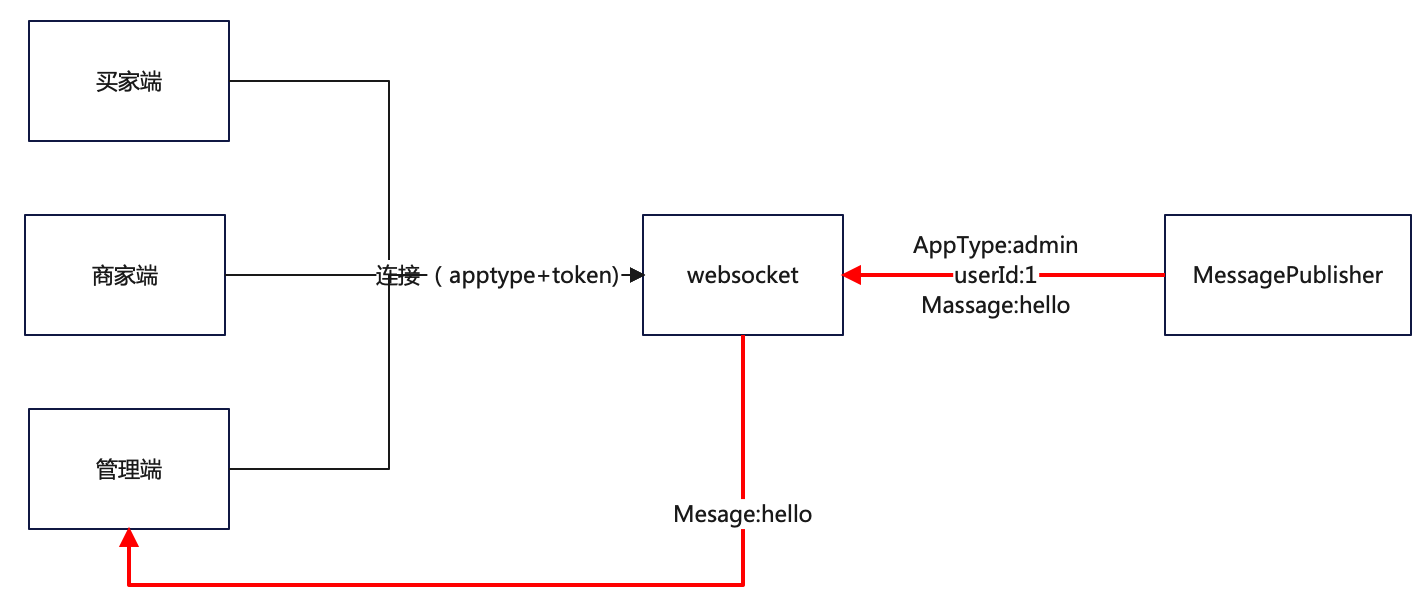
- websocket的session的唯一性要通过
userId来保证,多端(买家卖家管理端)情况下 userId可能会重复,所以需要通过apptype(admin,seller,buyer)来隔离 - ui和websocket建立连接时需要传递apptype和token参数,token会校验、解析出userId
规范
建立连接
连接地址
ws://{ip}/ws/shop
参数
| 参数名 | 类型 | 说明 |
|---|---|---|
| appType | 字串 | Buyer("买家端"), Admin("平台管理端"), Shop("门店管理端") |
| token | 字串 | 登录后发放的access_token |
消息发送
接口
com.enation.app.javashop.framework.ws.MessagePublisher
参数
Message:
| 属性 | 类型 | 说明 |
|---|---|---|
| appType | 字串 | Buyer("买家端"), Admin("平台管理端"), Shop("门店管理端") |
| userId | Long | 用户id |
| moduleType | 字串 | 模块类型:见模块类型对照表 |
| data | 字串 | 要发送的数据 |
模块类型对照表
| 类型 | 对应模块 |
|---|---|
| SpuImport | spu数据导入 |
| SkuImport | sku数据导入 |
| ParameterImport | 参数数据导入 |
| GalleryImport | 相册数据导入 |
| GoodsDetailImport | 商品详情数据导入 |
| IM | Im消息 |
消息接收
参数规范
{
    "app_type": "Admin",
    "module_type": "import",
    "user_id": 123,
    "data": "hello 123",
    "msg_time": 1659085305
}
参数说明
| 属性 | 类型 | 说明 |
|---|---|---|
| app_type | 字串 | Buyer("买家端"), Admin("平台管理端"), Shop("门店管理端") |
| user_id | Long | 用户id |
| module_type | 字串 | 模块类型:见下表 |
| data | 字串 | 要发送的消息 |
module_type说明
| 值 | 说明 |
|---|---|
| SpuImport | spu导入 |
| SkuImport | sku导入 |
| ParameterImport | 参数导入 |
| GalleryImport | 相册导入 |
| GoodsDetailImport | 商品详情导入 |
| IM | IM消息 |
示例
UI端建立链接
var wsurl= "ws://wshost/ws/shop?token=xxx&appType=Admin";
var websocket = new ReconnectingWebSocket(wsurl);

websocket.onopen = function(event){
    console.log('建立连接')
}
服务器端发送消息
@Autowired
private MessagePublisher messagePublisher;

Message message = new Message();
message.setAppType(AppTypeEnum.Admin);
message.setUserId(123L);
message.setMsg("hello 123");
message.setModuleType("import");

messagePublisher.sendMessage(message);
UI端接收消息
 websocket.onmessage = function(event){
     console.log('收到消息:'+event.data)
 }